
License status
At the top of the TheFlex settings there is always a TheFlex Browser license section. This shows the current license status at a glance - so you always know whether the device is fully licensed or still in the trial period.
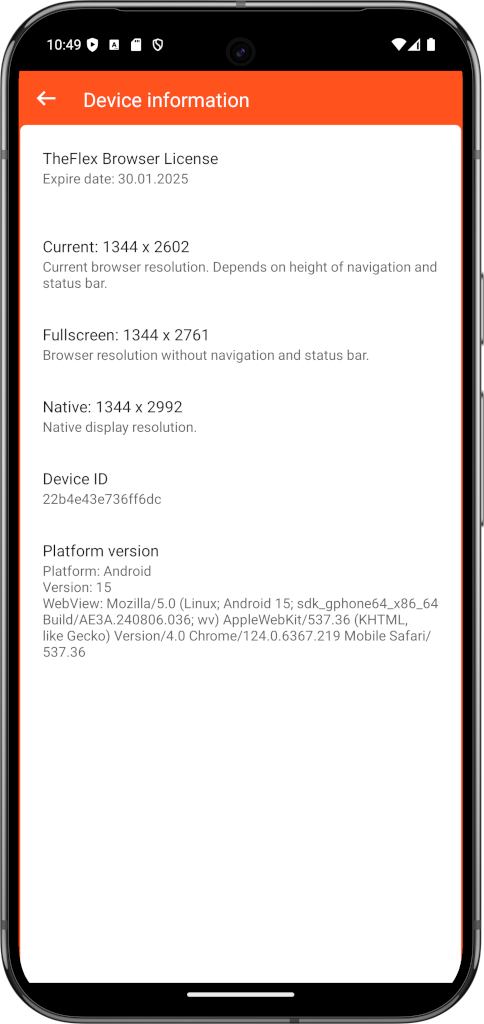
The following states are possible:
- Trial period active - The one-week trial is running. The remaining days are shown.
- Licensed - A valid license key is activated. The license is valid indefinitely unless a time-limited key is used.
- License expired - The trial period or a time-limited license has expired. The browser cannot be used productively until a license key is activated.
- No license - No trial has been started yet and no license key has been entered.
Notices during the trial period
When the 7-day trial period starts during initial setup, TheFlex says so right away - including the date it runs until. Two days before it ends a reminder appears again, so a license key can be entered in time.
Note
If the device already holds a valid license, a starting trial period does not overwrite it. The existing license is kept.
Activate a license key
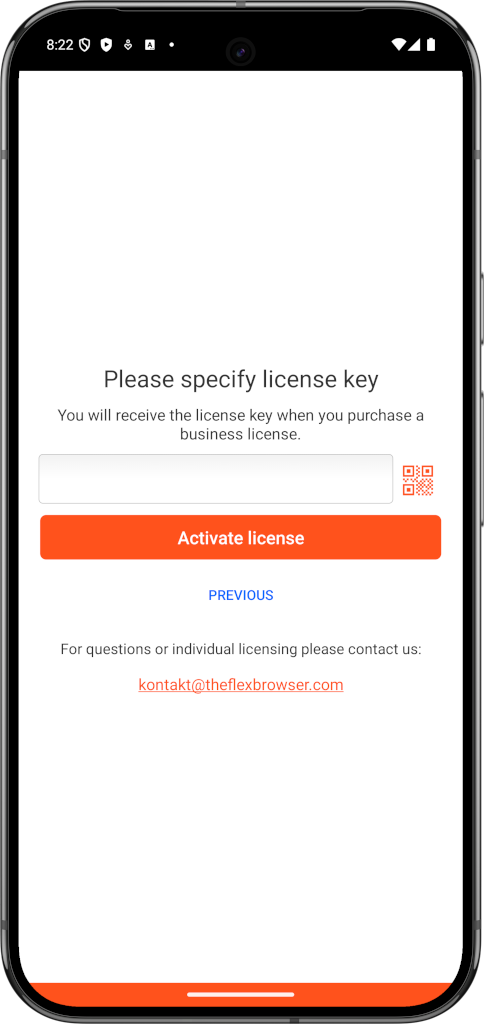
Tap on the license section to open the license page. There you can:
- Enter a license key manually
- Scan the QR code from your license certificate (recommended)
- Purchase a license directly via Google Play
Recommendation
Use the QR code scan instead of typing the license key by hand. The key is very long and easy to mistype. Simply scan the QR code from the license document we sent you.
Distribute licenses via MDM
If you manage multiple devices via an MDM system, the license key can be rolled out centrally - without having to touch each device individually.
Note
The license works completely offline. No internet connection, no license server, and no connection to our systems is required to activate or use the license.
What happens when the license expires?
If the trial period ends without a license key being activated, TheFlex will no longer open the configured start page. A message appears asking you to activate a license. Productive operation is then not possible until a valid license key is entered.
Attention
Plan enough time for license activation before going live. In critical production environments, we recommend activating the license well in advance via MDM so that all devices are ready from day one.