
Configuration of TheFlex with Intune
An MDM (Mobile Device Management System) is a software solution that helps businesses manage and secure mobile devices such as smartphones, tablets, and laptops. MDM systems allow organizations to remotely monitor, configure, and control devices, regardless of location or the network they are connected to. MDM systems are particularly useful for companies with a large number of employees accessing corporate resources through mobile devices.
The following article describes the procedure for configuring the Android version of TheFlex with Microsoft Intune.
Create an app-configuration policy
Visit the Microsoft Endpoint Manager website and log in with your credentials. Navigate to Apps and select App configuration policies.
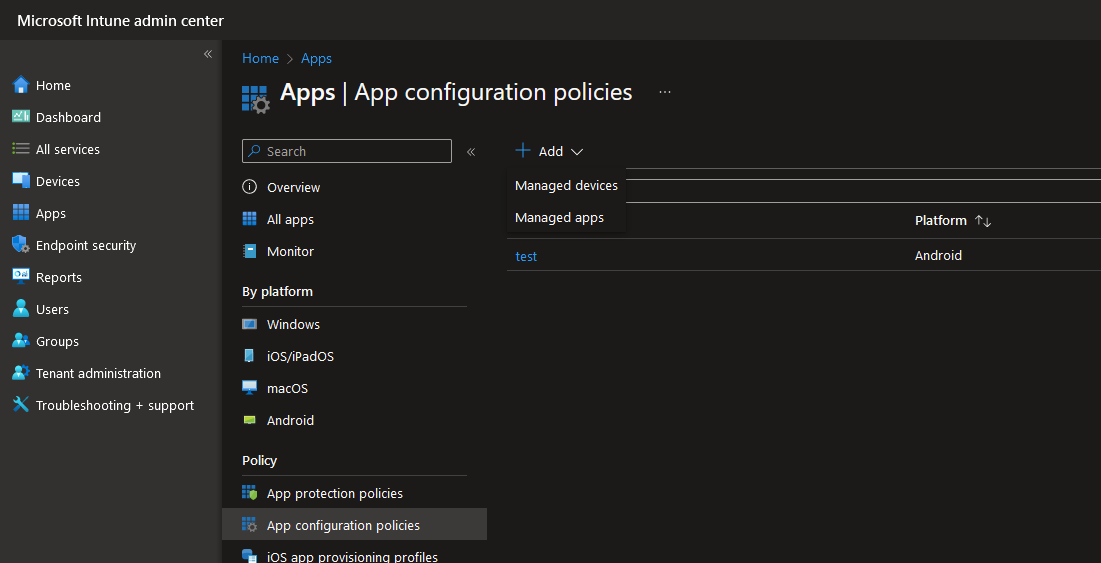
Click on Create new policy and select Managed Devices.
There you can select TheFlex as the name, Android Enterprise as the target platform, a corresponding profile type and finally the app TheFlex.
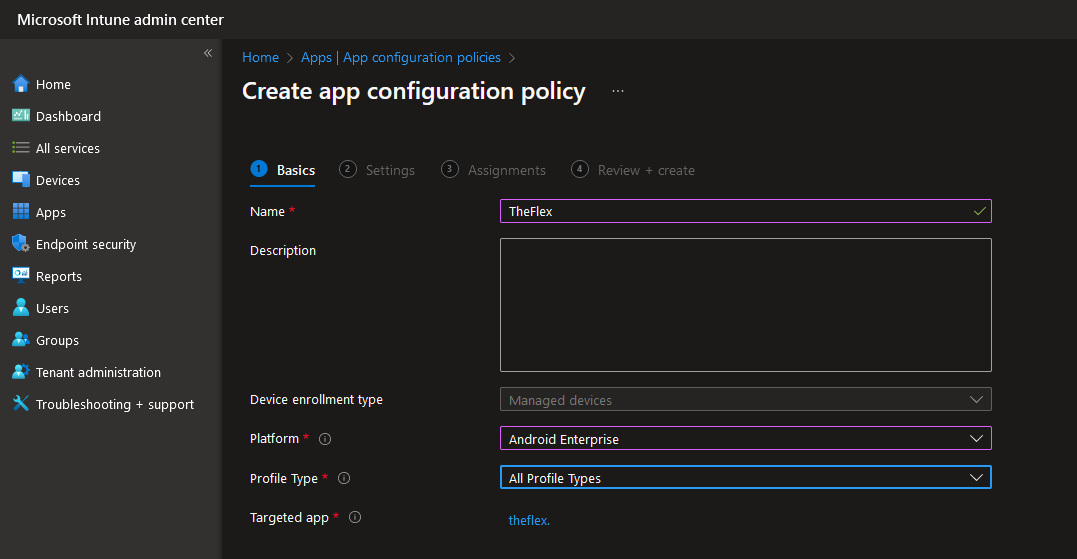
Configuration of the settings
Optionally, you can directly activate the required authorizations for TheFlex. The following authorizations are required for TheFlex:
- WiFi
- NFC
- Bluetooth
- Camera
- GPS
- Flashlight
- Vibrate
- Audio
- Read Storage
- Write Storage
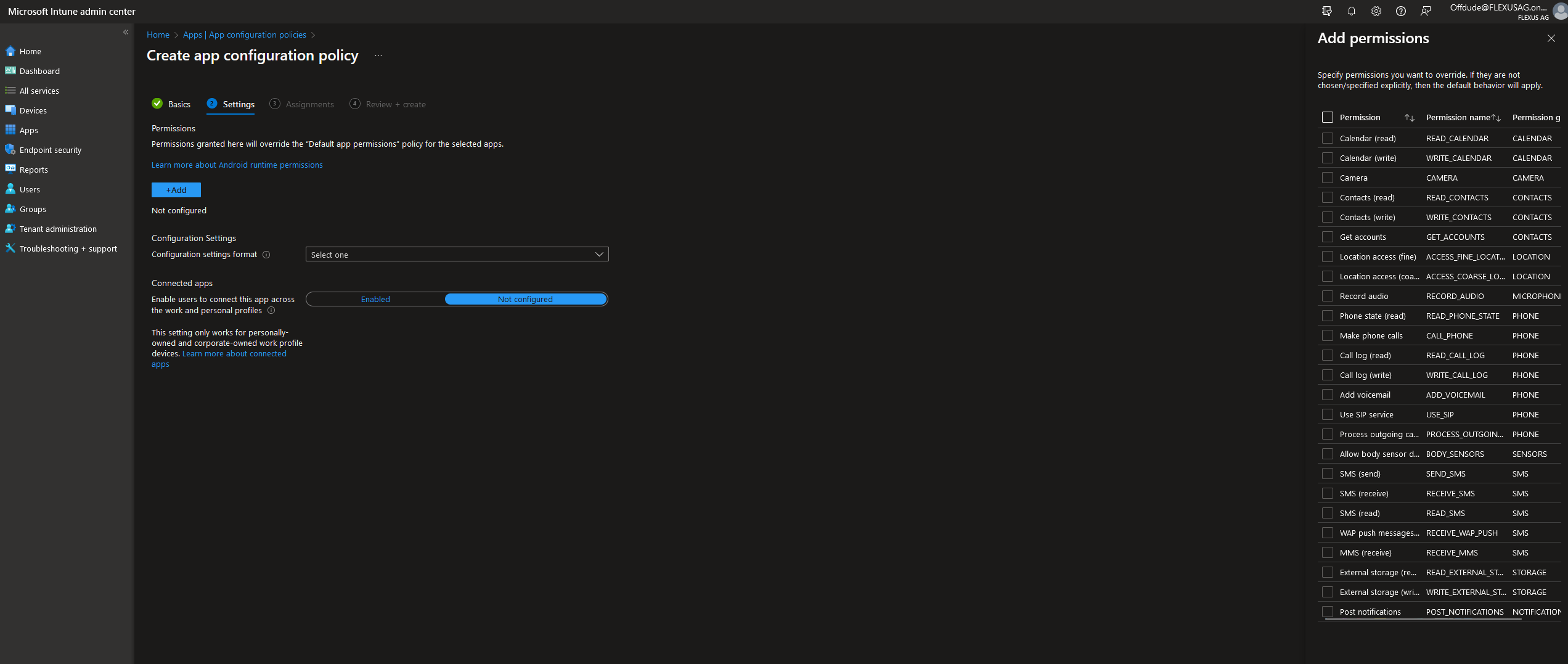
The next step is to configure the TheFlex-specific settings. As the most important and mandatory setting is the start pages, this cannot be done via the Intune interface. The reason for this is that several start pages can be configured and this function is not supported by Intune.
For this reason, the settings must be entered as JSON data:
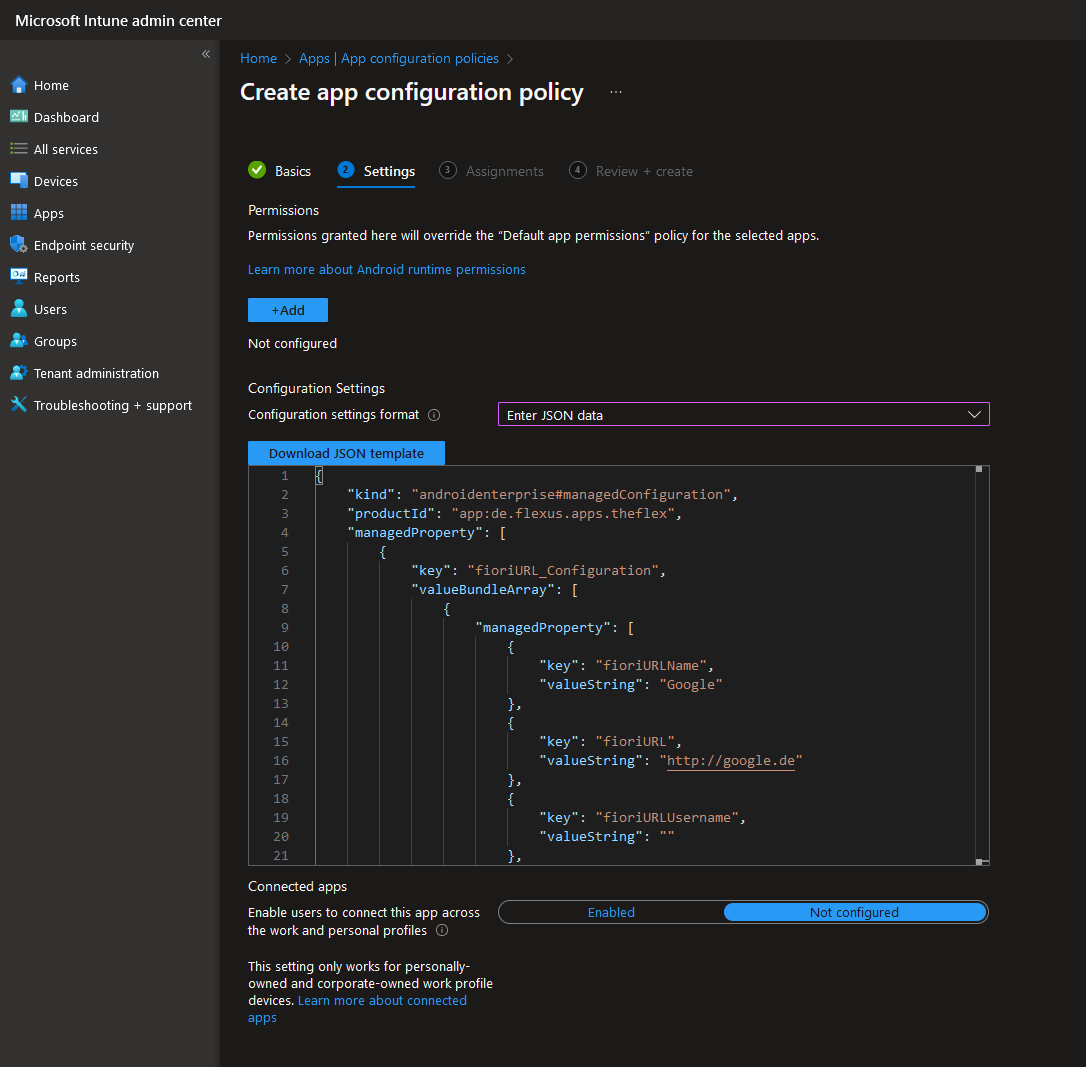
Intune automatically generates sample data. The recommendation is to copy this into another program such as Notepad++ and edit it there.
Configuration of normal settings
Most settings are predefined as either "true" or a number. These can be adjusted to the appropriate value as required or left at the default value.
Important: Intune automatically writes the value STRING_VALUE for all text settings. This must at least be replaced by an empty string "". However, it is recommended to replace this STRING_VALUE with a valid setting:
| Setting | Possible values (always enter in "") |
|---|---|
| Additional displays | "none", "PROGLOVE_MARK_DISPLAY_SDK", "NIMMSTA_HS50_SDK" |
| Keyboard behavior | "default", "deactivated", "Active_on_tap" |
| Language | "de_DE", "en_EN" |
| Logging | "ERROR", "WARN", "INFO", "DEBUG" |
Configuration of the license
The license code can be entered as valueString under the flx_license key. The license code must also be placed in quotation marks here, otherwise it will not be recognized as valid by Intune.
Configuration of the start pages
At least one start page must be configured, otherwise TheFlex will reject the configuration as invalid and reset it. To do this, at least one managedProperty must be added or configured in the fioriURL_Configuration section:
- fioriURLName: Name of the start page (mandatory, must not be empty)
- fioriURL: URL of the start page (mandatory, must not be empty)
- fioriURLUsername: Optional SAP user
- fioriURLPassword: Optional SAP password
Recommendation
At the end of this article is a valid configuration as JSON. This can be copied into Microsoft Intune. It is recommended to insert a valid license code directly.
Note
In some cases, it may be useful to transfer all settings to the devices via Intune except for the username and password.
This may be necessary if all settings are to be centrally managed, but users still need to be able to save their personal login credentials for certain start pages.
To enable this with Intune, a "/" (a single slash) must be entered as fioriURLUsername and fioriURLPassword in Intune. If the device receives a "/", it will not overwrite the local setting.
Selection of user groups
The next step is to configure which device or user groups this configuration policy should apply to.
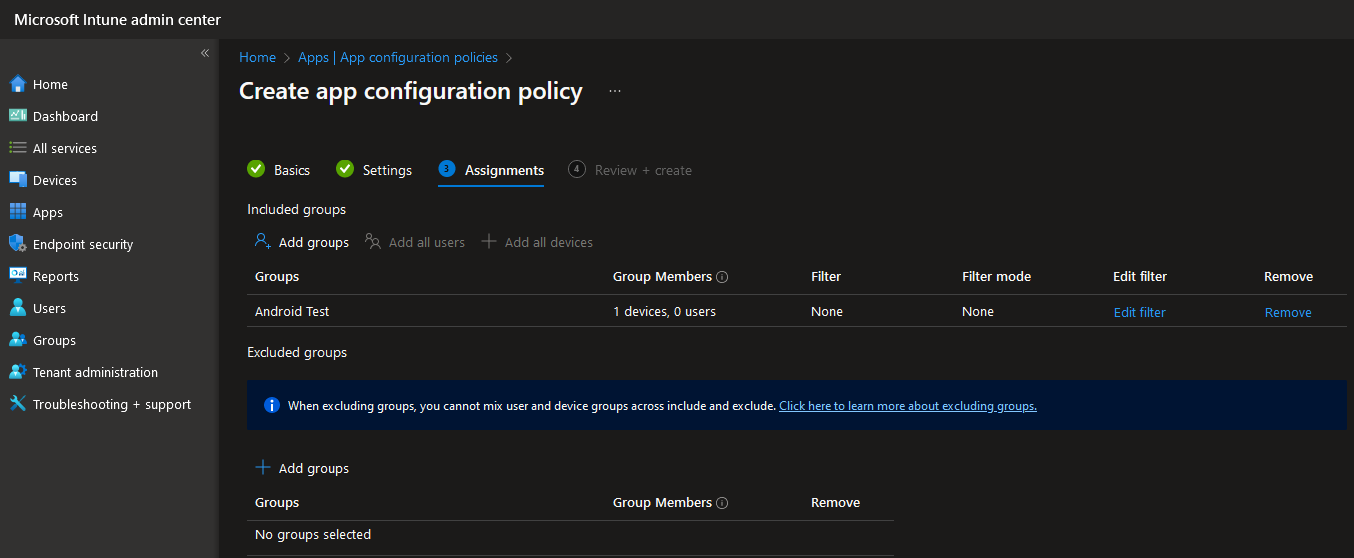
The app and Intune settings are then automatically distributed to all selected devices.
Caution
If TheFlex was already installed and configured, for example for local testing, the settings must be reset. This can be done either in the TheFlex or the general Android settings.
Example JSON for an Intune configuration
The following JSON is a complete template containing all available TheFlex settings. Copy it into Intune's JSON editor and adjust the values as needed. Keep all top-level keys in place and only change their values - the validator below treats every top-level key as mandatory.
Validate your own JSON
Already have a configuration? Paste it into the validator below to check it against this reference before importing it into Intune. It runs entirely in your browser and points out exactly what is wrong.
{
  "kind": "androidenterprise#managedConfiguration",
  "productId": "app:de.flexus.apps.theflex",
  "managedProperty": [

    { "key": "flx_license", "valueString": "" },

    {
      "key": "fioriURL_Configuration",
      "valueBundleArray": [
        {
          "managedProperty": [
            { "key": "fioriURLName",     "valueString": "My App" },
            { "key": "fioriURL",         "valueString": "https://my-sap-system.example.com" },
            { "key": "fioriURLUsername", "valueString": "" },
            { "key": "fioriURLPassword", "valueString": "" }
          ]
        }
      ]
    },

    { "key": "menuStartpagesEnabled", "valueBool": true },
    {
      "key": "menuStartpage_Configuration",
      "valueBundleArray": [
        {
          "managedProperty": [
            { "key": "menuStartpageTitle",  "valueString": "Picking" },
            { "key": "menuStartpageUrl",    "valueString": "https://my-sap-system.example.com/picking" },
            { "key": "menuStartpageFolder", "valueString": "Warehouse/Zone A" }
          ]
        },
        {
          "managedProperty": [
            { "key": "menuStartpageTitle",  "valueString": "Goods Receipt" },
            { "key": "menuStartpageUrl",    "valueString": "https://my-sap-system.example.com/goods-receipt" },
            { "key": "menuStartpageFolder", "valueString": "Warehouse/Zone A" }
          ]
        },
        {
          "managedProperty": [
            { "key": "menuStartpageTitle",  "valueString": "Inventory" },
            { "key": "menuStartpageUrl",    "valueString": "https://my-sap-system.example.com/inventory" },
            { "key": "menuStartpageFolder", "valueString": "Warehouse" }
          ]
        },
        {
          "managedProperty": [
            { "key": "menuStartpageTitle",  "valueString": "Dashboard" },
            { "key": "menuStartpageUrl",    "valueString": "https://my-sap-system.example.com/dashboard" },
            { "key": "menuStartpageFolder", "valueString": "" }
          ]
        }
      ]
    },

    { "key": "adminPassword",             "valueString": "" },
    { "key": "requirePasswordLaunchpad",  "valueBool": false },
    { "key": "SslUntrustIgnore",          "valueBool": false },
    { "key": "flxBlockCopyPaste",         "valueBool": false },
    { "key": "FlxCertChooser",            "valueBool": false },
    { "key": "FlxUseSmartcard",           "valueBool": false },
    { "key": "FlxClientCertAlias",        "valueString": "" },
    { "key": "NFCConfig",                 "valueString": "" },

    { "key": "FlxPdfViewerEnabled",       "valueBool": true },
    { "key": "FlxProgressIndicator",      "valueBool": true },
    { "key": "FlxDebugMode",              "valueBool": false },

    { "key": "FLXShowStatusBar",          "valueBool": true },
    { "key": "FLXShowNavigationBar",      "valueBool": true },
    { "key": "FlxToolbarOverlap",         "valueBool": true },
    { "key": "FlxShowCloseButton",        "valueBool": false },
    { "key": "FlxKeepScreenOn",           "valueBool": false },
    { "key": "FlxConnectionStatus",       "valueBool": false },
    { "key": "FlxOverlayTabsEnabled",     "valueBool": true },
    { "key": "FlxOverlayTabSize",         "valueString": "M" },
    { "key": "ZoomAmount",                "valueInteger": 100 },
    { "key": "flxSelectedLanguage",       "valueString": "" },

    { "key": "FLXSoftInputModeResize",    "valueBool": true },
    { "key": "flxKeyboardPreferences",    "valueString": "default" },
    { "key": "flxHidScanConfig",          "valueBool": false },

    { "key": "flxPairedDevice",           "valueString": "none" },
    { "key": "flxPairedDevice_ScanMode",  "valueString": "default" },

    { "key": "ClearSessions",                  "valueBool": true },
    { "key": "ClearCacheOnExit",               "valueBool": true },
    { "key": "ClearCookieOnSwitchingLaunchpad","valueBool": true },
    { "key": "ClearCacheOnSwitchingLaunchpad", "valueBool": true },

    { "key": "LogLevel", "valueString": "ERROR" },

    {
      "key": "customScript_Configuration",
      "valueBundleArray": [
        {
          "managedProperty": [
            { "key": "customScriptDescription", "valueString": "My Script" },
            { "key": "customScriptName",        "valueString": "https://my-sap-system.example.com*" },
            { "key": "customScriptCode",        "valueString": "console.log('TheFlex ready');" },
            { "key": "customScriptActive",      "valueBool": true }
          ]
        }
      ]
    },

    {
      "key": "customCSSSet_Configuration",
      "valueBundleArray": [
        {
          "managedProperty": [
            { "key": "customCSSDescription", "valueString": "My CSS" },
            { "key": "customCSSName",        "valueString": "https://my-sap-system.example.com*" },
            { "key": "customCSSCode",        "valueString": "body { font-size: 16px; }" },
            { "key": "customCSSActive",      "valueBool": true }
          ]
        }
      ]
    },

    {
      "key": "customKeyboardSet_Configuration",
      "valueBundleArray": [
        {
          "managedProperty": [
            { "key": "inputType",       "valueString": "default" },
            { "key": "cKeyboard",       "valueString": "{ 'rows': [{ 'buttons': [{ 'text': 'ENTER', 'function': 'ENTER', 'color': '#ffff33', 'weight': 1 }] }] }" },
            { "key": "customParameter", "valueString": "" }
          ]
        }
      ]
    },

    {
      "key": "scanConfig_Configuration",
      "valueBundleArray": [
        {
          "managedProperty": [
            { "key": "scanConfigName",        "valueString": "EAN-13" },
            { "key": "scanConfigLengthRule",  "valueString": "EXACT" },
            { "key": "scanConfigMatchLength", "valueInteger": 13 },
            { "key": "scanConfigMatchText",   "valueString": "" },
            {
              "key": "scanConfigActions",
              "valueBundleArray": [
                {
                  "managedProperty": [
                    { "key": "scanConfigActionType",  "valueString": "CUT_FIRST" },
                    { "key": "scanConfigActionCount", "valueInteger": 1 },
                    { "key": "scanConfigActionText",  "valueString": "" }
                  ]
                }
              ]
            }
          ]
        }
      ]
    }

  ]
}
Note
JSON does not support comments. The structure above is for readability in this documentation only. Adjust the values to your needs, but keep all top-level keys in place.
Explanation of all Intune JSON keys
The Required column shows whether a key must be present. All top-level keys are required (their value may still be empty, for example an empty license). For keys inside a list (start pages, scripts, CSS, keyboards, scan configurations), "Required" applies when such an entry is present. You can check your own JSON against these rules with the validator in the previous section.
License
| Key | Type | Required | Description |
|---|---|---|---|
flx_license | string | Yes | TheFlex license key |
Classic start pages (fioriURL_Configuration)
| Key | Type | Required | Description |
|---|---|---|---|
fioriURLName | string | Yes | Display name |
fioriURL | string | Yes | URL to open |
fioriURLUsername | string | No | SAP username - use "/" to preserve the local value |
fioriURLPassword | string | No | SAP password - use "/" to preserve the local value |
Menu start pages
| Key | Type | Required | Default | Description |
|---|---|---|---|---|
menuStartpagesEnabled | bool | Yes | false | Activates the folder-based menu navigation. Note: When enabled, the classic start pages (fioriURL_Configuration) are no longer shown in the menu. |
menuStartpageTitle | string | Yes | - | Display label |
menuStartpageUrl | string | Yes | - | URL to open |
menuStartpageFolder | string | Yes | "" | Folder path for this entry. The key must be present, but the value may be empty. Use "/" as separator for nested subfolders, e.g. "Warehouse/Zone A". All entries with the same path appear in the same folder. Leave empty ("") to place the entry at the root level (no folder). |
Folder path examples
The value of menuStartpageFolder determines where in the menu the entry appears:
| Value | Position in the menu |
|---|---|
"" | Root level - directly in the menu, not inside any folder |
"Warehouse" | Inside folder Warehouse |
"Warehouse/Zone A" | Inside subfolder Zone A, which is inside Warehouse |
The JSON example above would produce this menu structure:
📁 Warehouse
   📁 Zone A
      📄 Picking
      📄 Goods Receipt
   📄 Inventory
📄 Dashboard
Entries with identical paths are automatically grouped into the same folder. Folders are created implicitly - they do not need to be defined separately.
Security
| Key | Type | Required | Default | Description |
|---|---|---|---|---|
adminPassword | string | Yes | "" | Admin password for settings access |
requirePasswordLaunchpad | bool | Yes | false | Require password to switch start pages |
SslUntrustIgnore | bool | Yes | false | Allow HTTPS connections with invalid certificates |
flxBlockCopyPaste | bool | Yes | false | Block copy & paste from web content |
FlxCertChooser | bool | Yes | false | Show certificate selection dialog at login |
FlxUseSmartcard | bool | Yes | false | Enable NFC smartcard authentication |
NFCConfig | string | Yes | "" | Smartcard configuration (imported via QR) |
User interface
| Key | Type | Required | Default | Description |
|---|---|---|---|---|
FLXShowStatusBar | bool | Yes | true | Show Android status bar |
FLXShowNavigationBar | bool | Yes | true | Show Android navigation bar |
FlxToolbarOverlap | bool | Yes | true | Toolbar overlays content instead of pushing it down |
FlxShowCloseButton | bool | Yes | false | Show close/exit button in toolbar |
FlxKeepScreenOn | bool | Yes | false | Prevent screen from turning off |
FlxConnectionStatus | bool | Yes | false | Show connection status indicator |
FlxOverlayTabsEnabled | bool | Yes | true | New tabs open as a bottom-sheet overlay panel |
FlxOverlayTabSize | string | Yes | "M" | Size of the overlay controls: "S", "M", "L" |
ZoomAmount | string | Yes | "100" | Page zoom in percent |
flxSelectedLanguage | string | Yes | "" | App language: "" (system), "de_DE", "en_EN" |
Keyboard
| Key | Type | Required | Default | Description |
|---|---|---|---|---|
FLXSoftInputModeResize | bool | Yes | true | Keyboard pushes UI content up (instead of overlaying) |
flxKeyboardPreferences | string | Yes | "default" | When keyboard opens: "default", "Active_on_tap", "deactivated" |
Paired device (backhand scanner)
| Key | Type | Required | Default | Description |
|---|---|---|---|---|
flxPairedDevice | string | Yes | "none" | "none", "PROGLOVE_MARK_DISPLAY_SDK", "NIMMSTA_HS50_SDK" |
flxPairedDevice_ScanMode | string | Yes | "default" | "default", "onlyBarcodes", "onlyQRCode" |
Cache & cookies
| Key | Type | Required | Default | Description |
|---|---|---|---|---|
ClearSessions | bool | Yes | true | Clear session data on app exit |
ClearCacheOnExit | bool | Yes | true | Clear file cache on app exit |
ClearCookieOnSwitchingLaunchpad | bool | Yes | true | Clear cookies when switching start pages |
ClearCacheOnSwitchingLaunchpad | bool | Yes | true | Clear file cache when switching start pages |
PDF & display
| Key | Type | Required | Default | Description |
|---|---|---|---|---|
FlxPdfViewerEnabled | bool | Yes | true | Open PDF links in the embedded viewer |
FlxProgressIndicator | bool | Yes | true | Show loading indicator at the screen edge |
FlxDebugMode | bool | Yes | false | Enable extended debug logging |
Logging
| Key | Type | Required | Default | Description |
|---|---|---|---|---|
LogLevel | string | Yes | "ERROR" | "ERROR", "WARNING", "INFO", "DEBUG" |
Custom scripts (customScript_Configuration)
| Key | Type | Required | Description |
|---|---|---|---|
customScriptDescription | string | Yes | Display name |
customScriptName | string | Yes | URL pattern the script applies to (e.g. "https://my-system.com*") |
customScriptCode | string | Yes | JavaScript code to inject |
customScriptActive | bool | Yes | Enable/disable this entry |
Custom CSS (customCSSSet_Configuration)
| Key | Type | Required | Description |
|---|---|---|---|
customCSSDescription | string | Yes | Display name |
customCSSName | string | Yes | URL pattern the CSS applies to |
customCSSCode | string | Yes | CSS code to inject |
customCSSActive | bool | Yes | Enable/disable this entry |
Custom keyboards (customKeyboardSet_Configuration)
| Key | Type | Required | Description |
|---|---|---|---|
inputType | string | Yes | Input type: "default", "text", "password", "number", "email", "tel", "textarea", "custom" |
cKeyboard | string | Yes | Keyboard layout as JSON string |
customParameter | string | No | Optional parameter for "custom" input type |
Scan configuration (scanConfig_Configuration)
| Key | Type | Required | Description |
|---|---|---|---|
scanConfigName | string | Yes | Display name |
scanConfigLengthRule | string | Yes | Rule type: "FALLBACK", "EXACT", "AT_MOST", "AT_LEAST", "LENGTH_RANGE", "STARTS_WITH", "ENDS_WITH", "CONTAINS" |
scanConfigMatchLength | integer | Conditional | Target length (required for length-based rules) |
scanConfigMatchLengthMax | integer | Conditional | Maximum length (required for LENGTH_RANGE only) |
scanConfigMatchText | string | Conditional | Text pattern (required for STARTS_WITH, ENDS_WITH, CONTAINS) |
scanConfigActions | bundle array | Yes | List of actions applied to a matching scan |
Scan actions (scanConfigActions - nested bundle array):
| Key | Type | Required | Description |
|---|---|---|---|
scanConfigActionType | string | Yes | "CUT_FIRST", "CUT_LAST", "TAKE_FIRST", "TAKE_LAST", "PREFIX", "SUFFIX", "INSERT_AT", "EXTRACT", "REPLACE", "REMOVE_LEADING_ZEROS", "REMOVE_TRAILING_ZEROS", "PAD_LEFT", "PAD_RIGHT", "UPPERCASE", "LOWERCASE" |
scanConfigActionCount | integer | Conditional | Numeric parameter (character count, position) |
scanConfigActionCount2 | integer | Conditional | Second numeric parameter (e.g. length for EXTRACT) |
scanConfigActionText | string | Conditional | Text parameter (prefix/suffix text, search value, pad character) |
scanConfigActionText2 | string | No | Replacement value (for REPLACE) |