
Certificate-based login with a device certificate
Certificate-based login replaces the username and password with a personal digital certificate. Instead of typing credentials, the server checks the certificate and grants access.
There are two ways to store the certificate:
| Method | Where the certificate lives | Physical card needed? |
|---|---|---|
| Device certificate (this article) | On the Android device itself | No |
| Smartcard | On a DESFire NFC card | Yes |
This article covers the device certificate variant.
How it works
- A personal certificate is installed on the Android device (in the system keystore)
- The user opens TheFlex and navigates to the protected website or SAP system
- The server requests a client certificate
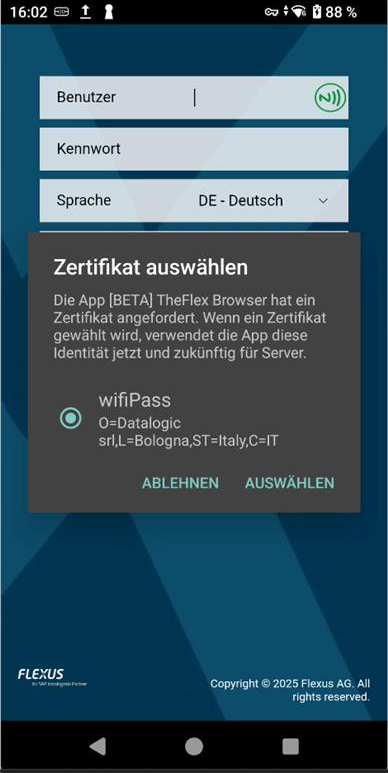
- Android shows a dialog listing the available certificates on the device
- The user selects their certificate - or it is selected automatically if only one is available
- The user is logged in
Recommendation
If each device is used by a single, fixed user, the certificate can be pre-installed and the dialog is skipped automatically. Login happens completely without any user interaction.
Prerequisites
- Certificate-based login must be enabled in the identity provider (SAP, Microsoft Entra ID, or similar)
- A personal certificate must be issued for each user
- The certificate must be installed on the Android device - typically distributed via MDM
For details on certificates and how to set them up in SAP or Azure, see the Know-How section on certificates.
TheFlex setting
The certificate selection is enabled by default under Settings → Security → Enable certificate selection at login.
Note
This setting only takes effect when the Smartcard option is disabled. If smartcards are active, TheFlex reads the certificate from the NFC card instead of asking the device keystore.
Comparison: device certificate vs. smartcard
| Device certificate | Smartcard | |
|---|---|---|
| Setup effort | Low - MDM distributes the certificate | High - NFC cards must be written and distributed |
| Portability | Certificate stays on the device | Employee always has their card with them |
| Shared devices | Less suitable - one certificate per device | Ideal - employee brings their own card |
| Personally assigned devices | Suitable | Suitable |
| Security | Certificate protected by Android keystore | Certificate encrypted on the NFC card |